Week 9 – Five Steps to Email Marketing

untitledEmail marketing can often be seen as the poor relation in the Digital marketing toolbox.  Yet companies still believe it to be very effective.  Today we’re going to look at the five steps in implementing an email marketing campaign.

Step 1:  Define Objectives

Because of its personal nature email is effective at delivering objectives like generating leads, renewing relationships with clients, introducing offers or enhancing brand reputation.  Set down specific, timed and realistic objectives.

Step 2: Manage Lists

Creating, updating and managing lists is an ongoing task. To generate a list collect emails from sign-ups, or downloadable documents  on your website.  If you have a store request email information by running a competition and wherever there is a networking opportunity be sure to get people’s business cards. Set up a system that ensures your data does not go out of date and is relevant to your message.  Segment your lists by geography, interest or business and customer type.email-sign-up

Step 3: Produce compelling content and offers

The decision to open or delete an email is made by how compelling the subject line is.  Give some thought to developing a clear, attention grabbing subject line.  Research shows that if the email is sent by an actual person rather than a company name the open rate is higher.  Provide valuable and relevant content to your email recipients with new product news, product offers or competitions.  Make sure there is an obvious and focused Call-to-Action and include social sharing button links.  Always include an unsubscribe link but here give your customer an option to come back at a later stage.

emailschedule

Step 4:  Schedule your emails

The time of day and the number of emails you send to your customers will differ from industry to industry.  Only send emails when you have something to say as cluttering up inboxes to generate awareness can have a negative effect and be frustrating for the recipient.  Sending Emails early in the morning has proven to be the best time for open rates.

Step 5:  Measure Results

A good email software provider will have the relevant measurement reports for your email campaign.  When sending the email choose the A/B subject line test option.  This allows you to send two different subject lines to a sample list,  the most effective line then is sent to the total subscribers list.   Look at open rates but more importantly the Click Through Rate and what content is being clicked on.  Be sure to track the measurements so you can get a picture of the type of emails and content that are more successful than others.

More and more emails are opened through mobile.  Watch this in your metrics and check how your emails render on both mobile and tablet.

Next week is the last week of the course.  We will be doing a review of the whole course so be sure to check in for a revision update.

Week 8 – How to find the right data that counts from Analytics

200163425-001This week the students are looking at where to start with using Google Analytics reports and what information matters.  If you haven’t already linked Google analytics to your website, then set up a Google account and place the Analytics code on each page of your site. Your web developer can do this for you also.

You can spend a lot of time going through data without a focus on what  you need to know. Stay focused on three things:  Data, Insights and Action. What you are looking for is information that will help you make decisions to improve your website and make it easier for your users to get what they are searching for.  One of the topical sets of data that businesses look at, presently,  is the  number of visitors who are accessing their websites through their mobile phone or tablet.  This insight will inform your decision on your need for a mobile friendly site.  Get information that lets you better understand your website users’ behaviour to take actions that are useful and relevant.

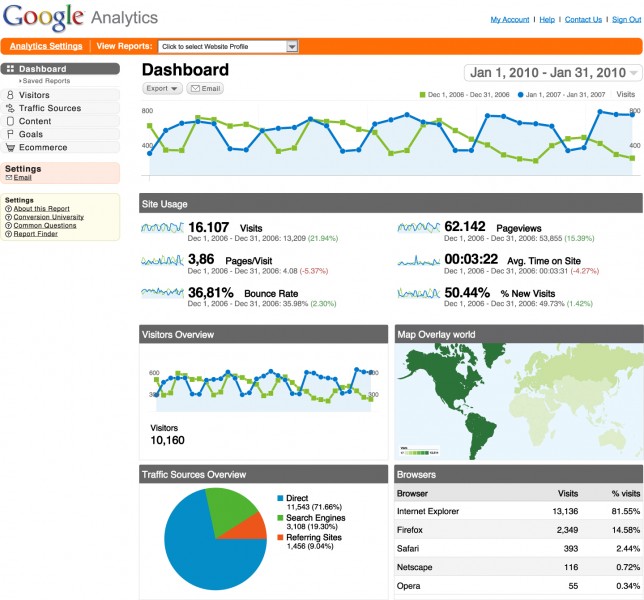
So now what?  Before you go to the extensive reports that Google supply begin with a pen and paper and write down the three main reasons why your website exists.  This will give you a set of objectives for your website.  Next list the things your website needs to do or what you want the visitor to do.  These are your website goals.  Then list the groups of people that matter most to your website.  This is your target audience.  With these three categories of information you are now ready to identity the data that you need.  In Analytics speak this data is called KPI’s – Key Performance Indicators.  A KPI might be the number of downloads of a ‘white paper’. the number of subscriptions to a newsletter or the number of repeat visits to a particular page.  Put numbers on these KPI’s with specific targets and a time period to achieve them.  Now you are ready to get the reports from Google Analytics.  google-analytics-dashboard1-644x600Create a dashboard with the reports that are most important to you and set a comparison on the data you get from one month to the next so you can see the historical performance of your site to identify trends in the data.

The final stage is to use this data to make useful, actionable decisions for your business.  For example a company maybe focusing its efforts in one geographic location but see that their website visitors are coming from a different location.  Changing your strategy to incorporate this new location will impact positively on your business.

Next week we will be looking at email as part of a Digital Marketing Strategy.

Week 7 – How to Build Links to your Website to Improve your SEO

link-buildingLast week while studying SEO we looked at Keyword Research.  This week we will look at three steps you can use to build links to your website that will improve your ranking on Google’s Search Engine Result Page (SERP).

1.  High Quality Content

Whether it is a blog post, a news item or curated content from another source you should always have the mind frame of your reader as your focus.   Ask yourself what is of interest to your customers?  Can the content address or solve a problem?  Organise the information so that it can be digested easily and scanned for top line news with more detail further on.  Look for topical and relevant content.

2. Build a Reputation with  Your Influencers

InfluencersDo a search for experts in your industry.  Use Twitter advanced search option to find people and companies who have built large audiences on Social Media.  Use sites that rank the top blogs in your sector.  Establish a relationship with them through commenting and sharing their content.  Connect with them on social media by following them and posting valuable commentary.

3. Make Content Sharable and Distribute

imagesCAHW6Q9VBefore you publish content make sure you add social network widgets and make them visible at the top and the bottom of the post. Consider adding Social Network ‘counters’.  These are social network icons that tabulate the number of shares.  Your content should encourage your readers to share with their networks.  So when tweeting a link make sure you have left enough characters for your audience to retweet.  Post a link of your content on relevant social media platforms such as Linkedin Groups, Facebook pages and Twitter.  Create categories and hashtags so your content will show up on searches.   Produce the content in different formats like posting images on Pinterest and instagram, slide shows on Slideshare and videos on Youtube including a link back to the landing page.

Check in next week when we will be learning about Google Analytics and finding the data that counts.

Week 6: What do I need to know about Search Engine Optimisation?

SEOWe’re Back!! After a well deserved mid-term break we’re back in the class room and ready to go.  This week we look at SEO and what practical tips we can use to improve the traffic to our website.  SEO deals with the factors that make your website more visible to your audience.  It starts with Google and the search engine results page (SERP).  Your goal is to rank high up on a results page when a user enters a search term that relates to your business.   SEO is a wide and complex subject that covers technical coding to easily managed changes you can make to your website.  Over the next two weeks we are going to cover two key areas that are practical, ‘can do’ elements.  This week we’ll look at:

 Keyword Research.KeywordResearch_graphic

Google presents the most relevant and current pages to a search result so it is important that you know the words that your audience are entering when looking for information about your product or service.  There are five basic steps to carrying out keyword research.

1.   Create a list of words.

Brainstorm all the words your customers would use.  Look at single words and multi-word phrases that they would use when researching and buying products.  Cover all the services your site offers and avoid generic terms.  Look at your competitors’ sites and check what words and phrases they are using.  You should now have a list of at least a hundred words.

2. Refine your list through the Google Keyword Planner Tool.Google-Keyword-Planner-Access


You will need a Google Adwords Account to access this very useful Google tool.  It is easy to set up and you do not need to have an ad campaign running.  The Keyword Planner allows you to upload your list of words, target the area your customers are in – e.g.  Ireland, Leinster, Dublin and gives you a report on the average number of monthly searches for all your terms.  Look at the variations of searches throughout the year.  For example the words ‘fitness’ and ‘diet’ have high volume of searches in January.

3.  Finalise your list

Create a spreadsheet to see each word’s search volume, discard the words that are not relevant to the site and have low volume.  Aim for 10 – 20 keywords for each service.  Your list should have a mix of targeted and broad keywords.  For example a broad term would be ‘boots’ or ‘red boots’.  A targeted term would be ‘Ladies red boots’ or women’s suede red boots’.

4. Plan your on-page content.

On page keywords

With your refined word list, build your words into the content of your website.  Use three or four related keywords per page and make sure they are in the Title Tag, Meta Description Tags, Meta Keywords Tags, Headings, Alt Text and images.  Do this for all new content like blogs, releases and social media posts.


5.Monitor and adjust your Keyword list.

As you post fresh content and measure the traffic/click-through rate you will build a picture of the content that is popular with your audience.  Be sure to monitor your keywords in your analytics report and  adjust your keyword list and content on an ongoing basis.

Next week we will look at Link Building for SEO with practical actions you can take.